Managing Ruyi Packages
The extension’s Packages view provides a visual interface for package management:
- Category Browsing: Packages are grouped by category; expand a package name to view all versions.
- Search & Refresh: Toolbar buttons support filtering by name or category and refreshing the list.
- Install/Uninstall: Behavior is consistent with the CLI; status updates in real time. Installed versions are marked with a green check.
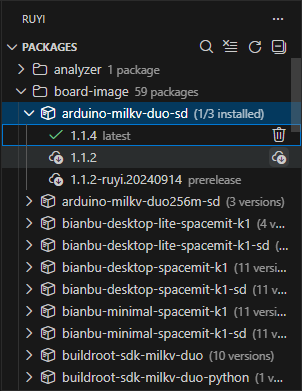
Note: Package sources, naming, and versioning follow the same conventions as the CLI. For detailed functionality, see Ruyi Package Manager.
Common Operations
- Install a toolchain: Select the target version (e.g.,
gnu-upstream) from the list and click Install. - Uninstall a toolchain: Click Uninstall on an installed version.
- Refresh the list: Use the toolbar refresh button or run
Ruyi: Refresh Package Listfrom the command palette.
If network access is restricted, configure a mirror source for Ruyi in the terminal first, then return to the extension for installation and updates. For CLI configuration methods, see installation.